
You set everything up carefully, climb into bed, pull up the covers, and then the little voice starts.
Is this actually working?
Maybe you expected to feel something and didn't. Maybe the Product Tester won't turn green. Maybe the setup worked beautifully when you first bought it and now, suddenly, it doesn't.
Those can all feel like the same problem. They aren't.
There's a difference between a grounding setup that's electrically disconnected and a grounding setup that's working perfectly well but doesn't produce an obvious sensation.
So before you replace the product, overhaul your bedding, or decide grounding just isn't for you, troubleshoot the connection in order. There are only a handful of places where the pathway can fail. Start at the wall and work toward your body.
First: Do Not Use How You Feel as the Test
Grounding doesn't have to feel like anything.
There's no requirement for a tingle, a hum, warmth, coolness, heaviness, or an instant wave of calm when you touch a properly grounded product. Some people notice sensations or changes when they start grounding. Others don't. Neither tells you whether the electrical connection is present.
That's exactly why Earthing provides testing equipment rather than asking you to judge the setup by feel. If you want to know whether the product is connected to ground, test the connection. That separates the electrical question from the personal-response question in one move.
Earthing makes the same distinction in its own troubleshooting guidance: it guarantees the grounding connection, not how any particular person will respond to being grounded. Earthing
Step 1: Check the Outlet Before You Check the Product
The wall outlet is where an outlet-based grounding setup begins. If there's no functioning ground there, everything downstream can be perfectly connected and the product still won't ground you.
This is especially worth checking in older homes. A receptacle can happily accept a grounded plug while having no usable ground conductor behind it, and someone may have swapped in a newer-looking outlet without touching the wiring. Looking at it tells you almost nothing.
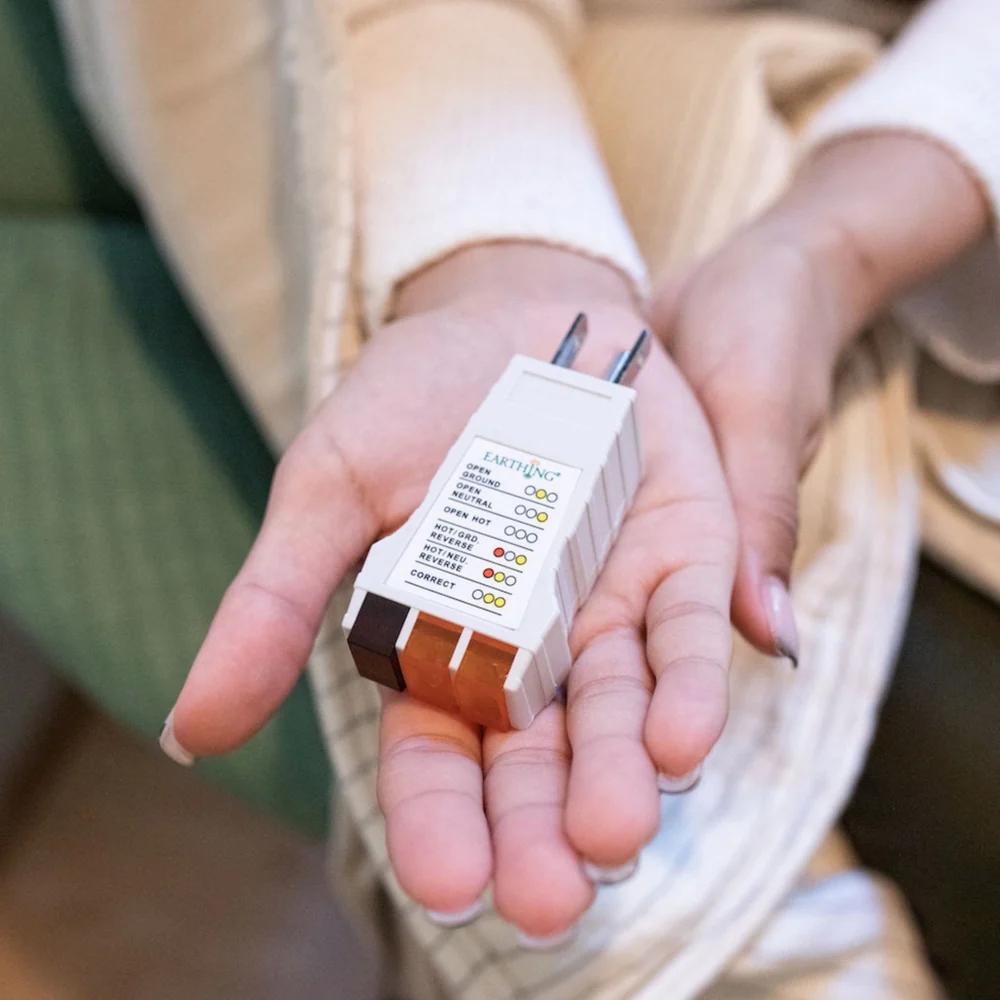
Use the correct Outlet Checker for the type of outlet in your country and follow the indicator pattern that came with it. With Earthing's current U.S. checker, two amber lights and no red light mean a correctly grounded outlet. The current Type G checker used in the UK and other Type G countries shows three amber lights when the outlet is correctly grounded. Earthing
If the checker doesn't show the right pattern, don't use that outlet for your Earthing product. Try another one. Homes aren't always electrically consistent, particularly older ones, so one bad receptacle doesn't mean every outlet in the house is ungrounded.
If none of them test correctly, the problem isn't your Sleep Mat or Mattress Cover. The grounding pathway stops at the building wiring. At that point, Earthing recommends either having the wiring assessed by an electrician or using an appropriate Ground Rod setup instead. Earthing
Step 2: Check the Safety Adapter and Coil Cord
Once you know the outlet is grounded, move one step closer to the product: first the Safety Adapter, then the Coil Cord.
Earthing's current setup places the Safety Adapter between the grounded outlet and the product cord. The Coil Cord should be pushed firmly into the adapter, and the other end should be snapped securely onto the product's connector. Earthing
This sounds too simple to cause trouble. It causes trouble precisely because it's so simple.
A cord can work loose behind the bed when the sheets get changed. The vacuum can catch it. Furniture gets shifted. The snap can look connected without being fully seated. The plug at the adapter can be nudged slightly out. And nothing announces that the connection has changed.
If the product worked last week and now seems not to, physically reconnect both ends before investigating anything more complicated. Disconnect the cord. Push it firmly back into the Safety Adapter. Reconnect the product end until the snap is secure. Then test again.
Step 3: Test the Coil Cord Separately if Necessary
The mat or cover isn't the only component that can fail. A damaged Coil Cord can break the whole pathway while the product itself is perfectly fine.
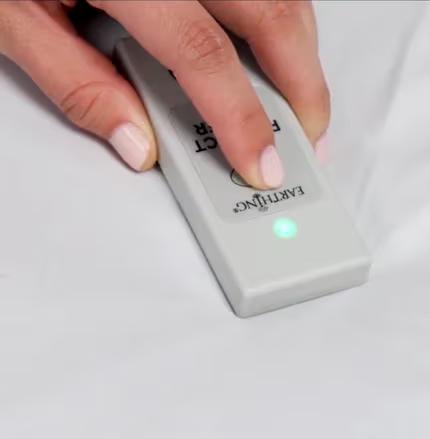
Earthing's current Product Tester instructions include a way to test the cord directly. Connect the cord to the Product Tester at one end and touch the other end to the metal disc on the back of the tester. When you activate the tester, a green indication means the cord is conducting correctly. Earthing
This is one of the most valuable troubleshooting steps, because cords are relatively easy to replace. Nobody wants to replace an entire Mattress Cover because a much smaller part stopped conducting.
If you have a spare Coil Cord, swapping it in can isolate the problem quickly. Earthing specifically recommends trying another cord when a product fails testing, because cords can fail independently of the conductive surface. Earthing
Step 4: Make Sure You Are Using the Product Tester Correctly
A Product Tester that won't turn green doesn't automatically mean the Earthing product has failed. The tester has its own setup.
Earthing currently instructs users to connect one Coil Cord from the Safety Adapter to the Product Tester and a second Coil Cord from the same adapter to the Earthing product. You then press the conductive plate on the bottom of the tester firmly against the product while holding the test button. Earthing
Pressure matters. If the tester is resting loosely on a soft Sleep Mat, the metal sensor underneath may not make full contact across the surface. Earthing recommends supporting the mat from beneath with your hand or something flat and firm, like a hardcover book, and pressing the tester down properly. Earthing
And before diagnosing anything else, test the tester itself. Press its button while it's away from the grounding product. Earthing says a quick green flash confirms the battery is working. No flash? Replace the CR2032 battery before you troubleshoot the product. Earthing
A dead tester battery can make a perfectly good grounding system look broken.
Step 5: Test More Than One Area of the Surface
Say the outlet is correct, the cord works, the tester battery is fresh, and the connections are secure. But one section of the product still won't test conductive.
Move the tester.
Earthing specifically recommends checking another area of the surface. If one spot produces a green result and another doesn't, the issue may be localized wear rather than a failure of the entire setup. Earthing
This matters most on older or heavily used products. Wear doesn't necessarily happen evenly. The area under your torso may take years of pressure and movement while an unused corner stays almost untouched, and a Universal Mat can wear most exactly where your feet usually rest.
So test the place your body actually contacts, not just the easiest clean corner to reach. If large areas stop testing properly even though the rest of the system checks out, that's when the conductive surface itself becomes the likely problem.
Step 6: Check What Is Between Your Body and the Product
The next link in the chain isn't electrical hardware. It's your bedding.
Direct bare-skin contact with the Earthing surface gives you the most immediate and reliable connection. But as we established in Article 111, the old blanket rule that any fabric completely blocks grounding is too simplistic.
Earthing's current guidance says a thin layer of cotton, bamboo, or a suitable cotton blend can become conductive as moisture from your body builds. That means a fitted sheet can be used over a Sleep Mat or Mattress Cover when the material and setup are appropriate. Earthing
Multiple layers are a different story. A thick mattress protector, a padded topper, a folded blanket, heavy synthetic bedding, or several layers stacked between you and the conductive surface can make the pathway far less reliable.
If you're troubleshooting, strip the variables away for a night. Put some bare skin directly on the Earthing surface. If everything tests correctly that way, the product probably isn't the problem, and you can add your preferred bedding back in.
Testing Through a Fitted Sheet Requires Moisture
This is an easy place to get a false negative.
You set the Product Tester on top of your ordinary fitted sheet. The light stays dark. You conclude the grounding mat underneath isn't working.
Earthing's instructions specifically say to add a drop of water to the sheet before testing through it. That small bit of moisture mimics the perspiration that naturally builds up during prolonged body contact and makes the fabric more conductive. Earthing
Then press the Product Tester firmly against the dampened spot. If it turns solid green, the setup is conductive through that layer under the tested conditions. Without the added moisture, a dry sheet may give you a very different reading.
Good troubleshooting reproduces the way the product actually works, rather than plunking a tester down somewhere and interpreting whatever happens.
Step 7: Look for Surface Buildup
Sometimes every electrical component works and the issue is sitting right on top of the conductive material.
Skin oils accumulate. Rich moisturizers transfer from your body. Body oils leave residue. Soap can linger after cleaning. On older conductive textile products, unsuitable fabric treatments can coat the conductive fibers.
Residue is one of the last things to investigate, after the outlet, cord, connection, and contact have all been checked, but it's a real culprit.
For Earthing's current carbon-based Sleep Mats and Mattress Covers, the company recommends wiping the conductive surface regularly with a damp cloth. When a deeper clean is needed, use a small amount of mild household soap, then wipe again with clean water to remove the soap itself, and let the product air dry completely. Earthing
Skip the aggressive cleaners. Bleach, disinfectants, whitening agents, oils, and harsh chemicals can damage or coat the conductive surface.
If a previously dependable product starts behaving inconsistently and hasn't been cleaned in a while, cleaning and retesting is a sensible step before replacement.
Step 8: If It Worked Before and Suddenly Stopped, Ask What Changed
This question often finds the answer faster than testing everything at random.
A grounding system that worked for months didn't spontaneously become a different system overnight. Something changed.
Maybe the bed was moved. Maybe the cord was pulled loose. Maybe an outlet was replaced or electrical work was done in the house. Maybe the product was cleaned differently. Maybe a new mattress protector appeared, or the fitted sheet changed from cotton to something synthetic. Maybe a cord was damaged. Maybe the tester battery died. Maybe the conductive surface has finally developed localized wear.
If a product "worked and then stopped," work back through the connection, because something in that chain is different now. That's far more productive than starting from the assumption that grounding itself somehow stopped working for you.
What if the Outlet Tester Says Open Ground?
A three-prong outlet can still have an open ground. This is especially common in older homes where modern-looking receptacles were installed without adding a grounding conductor behind them.
If the Outlet Checker says the ground is missing, that round grounding hole isn't giving your product the pathway it needs. Don't try to solve that by buying another grounding mat. The problem is upstream.
Try another properly grounded outlet. If none are available, talk to a qualified electrician or use an appropriate Earthing Ground Rod system where suitable. Earthing's own setup guidance treats this as a wiring issue rather than a product failure. Earthing
What if You Use a Surge Protector or Extension Cord?
That can work, as long as it preserves the ground connection.
Earthing currently allows an appropriate three-prong surge protector or extension cord, provided the unit itself tests correctly with the Outlet Checker. Earthing
Don't assume that because an extension has three holes, the grounding path is definitely intact. Test the outlet you're actually connecting the Earthing system to. That keeps your troubleshooting tied to the real connection rather than to how the hardware looks.
When the Product Itself Becomes the Likely Problem
If the outlet tests correctly, the adapter is connected properly, the tester battery is good, more than one Coil Cord has been tried, the tester is making firm contact, and the conductive surface still fails in multiple places, the product itself becomes the likely point of failure.
Earthing's current troubleshooting page says that if a Product Tester won't respond on a fresh battery and after trying another cord, there's likely a fault in the product or cord rather than the setup. Earthing
If the item is within its warranty period, contact Earthing support with your order information and the details of the testing you've already done. If the surface is older and significantly worn, replacement may simply be the sensible next step.
The point is that you get there by elimination, not by guesswork.
Frequently Asked Questions
Why Can't I Feel Anything on My Grounding Sheet?
Because a working grounding connection doesn't necessarily produce a sensation. You may feel something or nothing at all. Verify the electrical pathway with the Outlet Checker and Product Tester rather than judging it by how your body feels.
Does a Grounding Sheet Work Through Pajamas or a Fitted Sheet?
Direct skin contact is the simplest option, but Earthing's current guidance allows thin natural-fiber layers like cotton or bamboo because moisture can make them conductive enough over time. Multiple or heavily insulating layers are less reliable. If you're troubleshooting, use direct skin contact for a night to remove the fabric variable.
My Outlet Has Three Prongs but the Checker Says It Is Not Grounded. Is That Possible?
Yes. A modern-looking receptacle can be installed on older wiring without a functioning equipment ground. Use another outlet that tests correctly, have the wiring assessed by an electrician, or use an appropriate Ground Rod setup.
How Do I Know Whether the Problem Is the Cord or the Mat?
Test the Coil Cord separately with the Product Tester, or swap in another known-working cord. Then test several areas of the conductive surface. Earthing specifically recommends both steps before concluding that the product itself has failed. Earthing
My Grounding Product Worked and Then Stopped. What Should I Check First?
Start again at the outlet, then check the Safety Adapter and Coil Cord, followed by the Product Tester and the conductive surface. Sudden problems are often a disturbed connection, a failed cord, a dead tester battery, or something that changed in the bedding or wiring.
Can Lotion or Body Oil Affect the Product?
Repeated residue can build up on the conductive surface and interfere with reliable contact. Clean the product according to the instructions for your specific model and avoid harsh chemicals.
What if Everything Tests Green but I Still Do Not Notice Anything?
Then the electrical question is answered: the grounding pathway is working. Whether you personally notice a particular change is a separate question, and Earthing doesn't guarantee an individual response. Earthing
Work the Chain Instead of Guessing
Most grounding problems aren't mysterious. There's a pathway.
The earth connects to the building ground. The outlet connects to the Safety Adapter. The adapter connects to the Coil Cord. The cord connects to the Earthing product. The conductive surface connects to your body.
If the pathway fails, start at one end and move through it. Verify the outlet. Secure the adapter and cord. Check the tester. Test several areas. Simplify the bedding. Clean away residue. Only after all of that has been ruled out should the conductive product itself become the main suspect.
The whole idea comes down to one line: work the connection in order instead of guessing which part failed.
Two simple tools, the Outlet Checker and the Product Tester, turn most of that guesswork into something you can actually see. And once you know the setup is connected correctly, you can stop wondering whether the sheet is "working" and get back to the reason you bought it in the first place, without the second-guessing.

Leave a comment
This site is protected by hCaptcha and the hCaptcha Privacy Policy and Terms of Service apply.